
15 Best SOPs for Your Small Business (Created with Google Sheets)
Creating standard operating procedures for your small business is the simplest way to bring structure, consistency, and clarity to your daily operations without adding more overwhelm.
Running an online business can sometimes feel complicated, but it doesn't have to feel absolutely chaotic.
As a Solopreneur who doesn't farm out a single task; I wear all the hats in my business! I'm the content creator, the sales manager, the email marketing guru, the blogging extraordinaire, and so much more.
I can tell you that some days my business can feel way more complicated than it probably needs to be, but luckily, I have documented most of my tasks in what are known as standard operating procedures (SOPs).
Without them, my business would be full of forgotten processes, repeated errors, and more a whole pile of unnecessary frustration that could be easily avoided if I just wrote down how to do a task.
Creating SOPs doesn't have to be hard and they don't need to be 42 pages with appendices to be useful. I've created a list of 15 standard operating procedures for small businesses that will help you get through your day much easier.

What are Standard Operating Procedures (SOPs)?
So, what exactly are these SOPs that everyone's talking about? It stands for Standard Operating Procedure.
Think of your business as a restaurant, and your SOPs are the recipes for each dish. Each recipe is detailed in what ingredients you need, how to prepare them, how long to cook, bake, broil, etc. to turn those ingredients into a delicious meal.
To add to this visual, your business workflow chart is like the restaurant menu that has all your dishes portrayed in a organized fashion (breakfast, lunch supper, etc.), and your SOPs the recipes to create those meals.
Standard operating procedures for small businesses takes the guesswork out of tasks, ensuring consistency and efficiency in everything you do and keeping your online business organized!
Join hundreds of fellow online business owners get organized –
using Google Sheets
Why Are SOPs Important?
As a women solopreneur, having well-crafted SOPs means I have clear, documented procedures, for my small online business.
At the end of the day, I have no one else to turn to if I mess up a task or process and so I need to make sure that they are documented well enough that I can repeat them without difficulty and error-free.
To be clear, standard operating procedures for small businesses don't necessarily have be “click here, type this, press send” type of instructions unless you need them to be. If you need that level of detail, then you should include that level of detail.
Most of the time, the level of detail will be determined by the type of task, frequency it's done, etc. The great thing about writing your own SOP's is you can include as little or as much as you want, but remember, they need to be detailed enough that you can use them.
I have some SOPs that are super short because I do the task so often (like drafting my email newsletter) that I don't need to have extra detail, I can keep it pretty high-level. Then there are other tasks that I don't do as often (like blogging oops) that I have a more detailed SOP so I don't forget anything.
There is one caveat to this theory of “include only what you need”. It's if you're going to be farming out some of your tasks. In that case, you need to be pretty detailed in your SOP because you want that virtual assistant (VA) to do the process the way you want it done, quickly, correctly, and without 27 questions that make you just want to do it yourself.
So in short, creating standard operating procedures for your small business empowers you to maintain quality standards, save time, even free up some precious brain space, and if you want, delegate tasks.

What Are Standard Operating Procedures Templates?
SOP Templates are just like any other template. Instead of writing every SOP from scratch, a template gives you a consistent format. That way, every process you create looks and feels the same, which makes it much easier to use later.
At its core, an SOP template usually answers a few basic questions:
- What is this process for?
- When do I use it?
- What are the steps?
- What does “done” look like?
Why Google Sheets Works So Well for SOP Templates
While many people create SOPs in Google Docs or Microsoft Word, I think that Google Sheets offers a more practical way to actually use them in your day-to-day business.
In fact I recently decided that having a SOP Tracker Tab in my Google Sheets Business Dashboard / Second Brain is genius (if I do say so myself) and it's been a complete gamechanger for me ever since.
Because of the Second Brain, I never lose anything because I have all my SOPs linked in the SOP Tab. One click and I'm in whatever SOP I need, also in Google Sheets, and I can check off the steps as I complete them. It's just so easy!
In a Google Sheets, your SOP template can include:
- A checklist you can tick off as you go
- Links to the exact files, folders, or tools you need
- Columns for status (not started, in progress, complete)
- Notes or updates as you work through the process
This turns your SOP from a static document into something you actively use while you’re working.

15 Standard Operating Procedures for Small Business
OK, so we've discussed what SOPs are and why they're so important. Now you're thinking, OK Lindsay, but really, I only have a small online business, how many SOPs can I really need? That's a great question and it really depends on your business, but here's a few to get you started. You may not need them all and you might need others, but this is a great starting point.
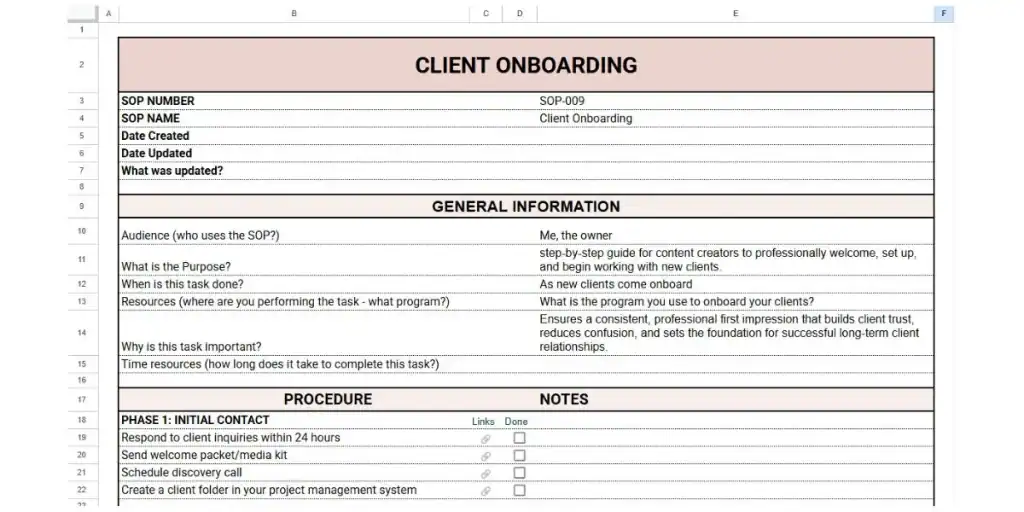
1. Client Onboarding Process
This procedure is going to outline the steps for welcoming new clients, gathering necessary information, and setting expectations. It's incredibly important that you have a standard system in place for welcoming new clients into your business.
This SOP will ensure consistency among clients, ensure all information is gathered and/or sent to the prospective client, payment terms are set, and many other important tasks.
If you offer services in your business, here is a 8-Step Onboarding Process with Templates that you can use to assist in getting this SOP set up.
2. Product Creation
In these standard operating procedures (SOPs) you'll want to detail the process for ideation, creation, editing, and listing your products. These processes can be one of the most time-consuming tasks in your day and you'll want to have them documented for easy reference.
If you process from start to finish is simple, you might have just one SOP for Product Creation. If you have a longer process, you might have it broken into Creating a Product, Listing a Product, Editing or Reviewing Products, etc.
There's no right or wrong answer on how many SOPs you create, it's completely up to you. I like shorter SOPs so I'd rather break my larger processes into smaller ones.
I only get short spurts to work on my business so having a single super long SOP just means I can never finish in one sitting. If I can break it up into smaller processes, I can check off one or two in my short work windows and walk away feeling like I accomplished something.
PRO TIP: If you use images, you should keep them saved in folders labelled with the site you got them from. The terms of use are different for each site and you must know how you can use the images or clipart, etc. File naming conventions are going to be a real life-saver in this case.

3. Email Marketing Campaign
Email Marketing SOPs will provide a step-by-step guide for planning, designing, scheduling, and tracking email marketing campaigns. This is also extremely important because every Email Service Provider (ESP) is going to operate differently and knowing how the program works is incredibly important.
The great thing about using Google Sheets for an SOP like this is that on one tab you can have your SOP documented with your email marketing guide and then on the next tab you can actually track your emails campaigns and track your conversions.
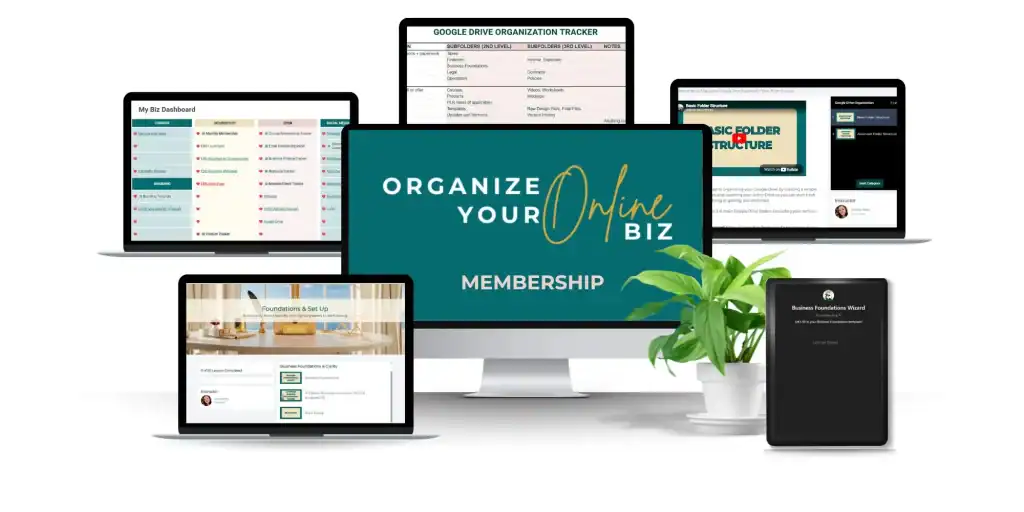
And this is all linked back to your Business Dashboard / Second Brain and you can start to see how business organization can be simpler than you expected. This is the type of thing I teach in my Organize Your Online Biz (OYOB) Membership.
I should also mention that if you're looking for done-for-you email marketing templates to further save you time, check out Liz Wilcox's (affiliate) Email Marketing Membership. I love anything that helps you, and me, save time! And this affordable membership does that.
4. Social Media Management
Social Media Management standard operating procedures (SOPs) are going to document the process for content scheduling, engagement, and tracking on various social media platforms.
You should consider keeping a separate SOP for each social media platform that you use. That way, if you decide to stop using one, you can just toss that SOP versus having to update a large all-inclusive SOP just to remove a section.
Pair this with your Social Media Google Sheets Trackers and you're truly making organizational progress!

5. Lead Generation and Followup
These standard operating procedures (SOPs) will describe the steps for acquiring leads, segmenting them, and following up with relevant information or offers. You may have several SOPs for lead generation as you may have several different tactics that you're using.
There is also the chance that you don't have to document anything special for this as perhaps you're lead generators are free products and you have that SOP documented under product creation or product launches (like a freebie) for example.
6. Product Launch SOP
These SOPs are going to outline the steps for launching a new product or service, including pre-launch, launch day, and post-launch activities.
You've created this amazing new product, so now what? Where are you selling it? Are you using a Skool Community (affiliate)? TpT? Etsy? What are the steps for uploading your new product? How do you SEO your title and description? How are you promoting your new product?
So many more questions, but you get the idea. Write it down.
Speaking from experience, this is one of my more detailed SOPs because it's not something that I do all the time. I focus mainly on my memberships so I'm not doing product launches too often.
That means, I need to really document all the steps and not assume I'll remember something, because I probably won't.
7. Customer Support and Help Desk
This standard operating procedure (SOP) is going to provide instructions for handling customer inquiries, troubleshooting issues, and escalating issues as needed.
How do customers get ahold of you? What is your response time (this should be noted somewhere so people KNOW when they email you, that you're not going to respond in say an hour)? Do you respond to DM's? Do you have a FAQ that you'll direct them to first?
Write it down and make it very clear to clients, customers, and anyone who may want to get a hold of you.

8. Financial Management and Bookkeeping
These standard operating procedures (SOPs) will detail the process for invoicing, expense tracking, budgeting, and financial reporting. This is so important. Don't skimp out on this!
How do you bill people? What payment companies are you using (Paypal, Stripe, etc.)? What are your monthly expenses? Do you have any annual expenses and when are they payable? Can you afford this awesome blogging tool that you really want?
Now, if you're one of those people who hear the words “finances” and “bookkeeping” and your eyes glaze over, no worries! I've got you! Check out Simply Accounting with Cheryl. She's going to help you make cents (see what I did there 😂) of all things financial.
9. Website Maintenance and Updates
Website Maintenance SOPs are going to list tasks related to keeping your website updated, including plugin updates, content additions, and security checks. So many people ignore this part. They blog and add products to sell, but don't think about maintaining their website – the very portal for their whole business.
When I was setting up my websites (I have two), I connected with this amazing woman Diane who runs WordPress Basics Guide. She helped me set up all my updates, what plug-ins were good, and even the design features. I can't recommend her enough!
I am reviewing this blog post nearly two years later and I still recommend Diane!
10. Sales Process
The standard operating procedure (SOP) for your sales process is going to define the steps from lead qualification to closing a sale, including follow-up procedures, if applicable.
This SOP is likely going to refer to other SOPs and that's completely fine. The first step in the sales process will be to create a product, that's an SOP in itself. Second might be to create sales pages, sales funnel, upsell items, test the sales pages, product delivery emails, etc.
This is similar to Product Launches for me, this SOP is more detailed because I feel I don't do it often but there's also a ton of small steps to remember.
11. Blog Post SOP
This SOP for your small online business is going to break down the steps involved in creating a blog post, from ideation to publishing. If you have been doing this forever you may think that it is an easy task, but it's still extremely important to have a well-documented Blog Post SOP.
What if you hire a Virtual Assistant to assist with writing your blog posts? While they may know how to write a blog post, you need to tell them how you want the posts done, how you want them SEO'd, the types of photos, where to get them, when the posts should be published, etc.
Are you in need of a virtual assistant or interested in becoming one yourself? Check out my friend Lynn's Facebook Group, How to Be a Virtual Assistant. Her group is growing super fast with all the great information she provides.
12. Search Engine Optimization (SEO)
SEO is Search Engine Optimization and it's about writing blog posts for your audience using keywords. These keywords help you rank better on Google, which in terms sends more of your desired audience to your blog. It's a beautiful circle of blogging life!
I broke this out into it's own SOP because I do keyword research in batches and I'm not usually writing my blog posts at the same time. This allows me to fully do this task and prepare myself to draft the blog posts.
My Blog Post SOP is more of a check list for each blog post to ensure I don't forget things like backlinks and meta descriptions.
You might not need a separate SOP for this task, that's really your call. I love mine!

13. Backup and Data Recovery
This SOP will detail how data is backed up regularly and how to recover it in case of any loss. If you're a blogger, your hosting company may actually back up your information for you, but you'll need to check into that.
Even if your hosting company does back up your site, you will need to document when are the backups done. Where are they saved? How long are they saved for? And how to recover your site from a backup.
It's great to know that your stuff is being backed up, but you need to know how to find it if needed. And while you might not need this SOP often, using it just once, will pay for itself in prevented frustration.
14. Affiliate Marketing Process (if applicable)
If affiliate marketing is part of your business, this is one of those processes you don’t want to keep in your head.
At first, it might feel simple. You sign up for a program, grab a link, and start sharing it. But over time, things add up quickly. You’re working with multiple companies, different links, different payout structures, and different schedules for when (and how) you get paid.
Without a clear process, it becomes very easy to lose track of what’s working, and even easier to forget important details.
Your Affiliate Marketing SOP should outline how you:
- monitor what’s actually bringing in results
- choose and evaluate affiliate partners
- keep track of your links and where you’re using them
- understand how and when you get paid
Google Sheets is going to be your best friend for this SOP and again you can have your SOP on one tab, and track your affiliates in the other! Win-win!
15. Performance Metrics and Reporting
This SOP is going to explain how key performance indicators (KPIs) are tracked and reported to measure the business's success. This could be your sales on Etsy. How many sales this month vs the previous months, vs the same time last year, etc.
Tracking metrics is going to help you determine if you're company is progressing, staying the same, or maybe that new system that you put in place isn't really cutting it. Without documented metrics and KPIs, you're only really guessing if your strategies are paying off.

The Bottom Line
I hope that this has shown you the importance of developing standard operating procedures (SOPs) for all the processes within your business.
They take the pressure off having to remember everything and give you a clear way to move through your work without constantly second-guessing your next step. And over time, they help your business feel more stable and predictable.
Using Google Sheets to document your processes and simultaneously track data just makes sense because then things are together. Plus you'll use your SOP more if it's attached to your tracker. That's a win in my books!
So, what is the first SOP you're going to create?
If This Post Helped You In Any Way, Please Pin One of These Images Below
It helps my blog enormously. Thank you!


